HTTP Request Smuggling
Introduction#
- HTTP Request Smuggling is a vulnerability that arises when there are mismatches in different web infrastructure components.
- This include proxies, load balancers, and web servers that interpret the boundaries of HTTP requests.
- For example, consider a train station where tickets are checked at the multiple points before boarding. If each checkpoint has different critiria for a valid ticket, a traveller could exploit these inconsistencies to board without a valid ticket.
- Similarly, in web requests, this vulnerability mainly involves the Content-Length and Transfer-Encoding headers, which indicate the end of the request body. When these headers are manipulated or interpreted across the components, it may result in one request being mixed with another.
- Have a look at the following diagram to understand the concept better.
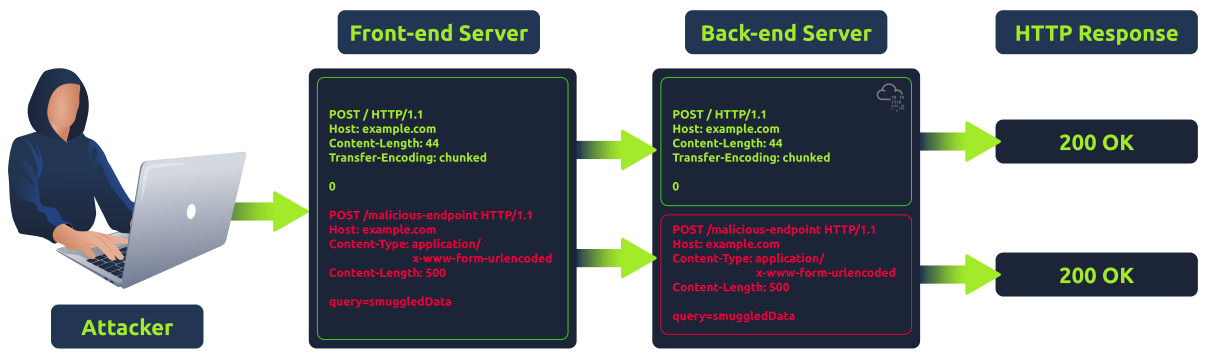
- Request splitting or HTTP desync attacks are possible because of the nature of keep-alive connections and HTTP pipelining, which allow multiple requests to be sent over the same TCP connection. Without these mechanisms, request smuggling would not be feasible. When calculating sizes for Content-Lenght (CL) and Transfer-Encoding (TE), its crucial to consider presence of carriage return
\rand newline\ncharacters. These characters are not only part of HTTP protocol’s formatting but also impact the calculations of content sizes. - While testing for this vulnerability, it is important to note that some tools might automatically “fix” the Content-Length header, by default. This means if you are using such tools to run paylaods, your content-Length might get overwritten, potentially changing the test results.
- Note that this, vulnerability can potentially break a website in many ways (cache poisoning, other user requests may start failing, or even the back end pipeline might get desynced), so extreme care should be taken when testing this on production website.
Modern Infrastructure#
Load balancers and reverse proxies#
- Load Balancers: These devices or services distribute incoming traffic network across multiple servers to ensure no single server is overwhelmed with too much traffic. This helps in ensuring high availability and reliability by redirecting requests only to online servers that can handle them. Load balancing for web servers is oftne done by reverse proxies. Example: AWS Elastic Load Balancer (ELB), HAProxy, NGINX, F5 BIG-IP etc
- Reverse Proxies: These devices sits before one or more web servers and forwards client requests to the appropriate web server. While they can also perform load balancing, their primary purpose is to provide a single access point and control for back-end servers. Example include: NGINX, Apache with mod_proxy module, and Varnish.
Role of Caching Machanisms:#
- Caching is a technique used to store and reuse previously fetched data or computed results to speed up subsequent requests and computations. In the context of web infracture:
- Content Caching: By storing web content that doesnt change frequently (like images, css, js files), caching reduces the load on origin servers and improves response times for users.
- DB Query Caching: By storing the results of expensive database queries, caching reduces the load on databases and improves response times for users.
- Full-page Caching: By storing entire web pages, need of regenerating them for each user is eliminated. Its usefull for websites with high traffic and static content.
- Edge Caching/CDNs: Content Delivery Networks (CDNs) cache content on closer to their users (at the “edge” of the network), reducing the latency and speeding up access for the users around the world.
- API Caching: Caching responses can significantly reduce the back-end processing for APIs thta serve similar requests repeatedly.
- Have a look at the diagram below for a better understanding of how caching works in modern web infrastructure:
Content-Length/Transfer-Encoding Smuggling (HTTP 1.1)#
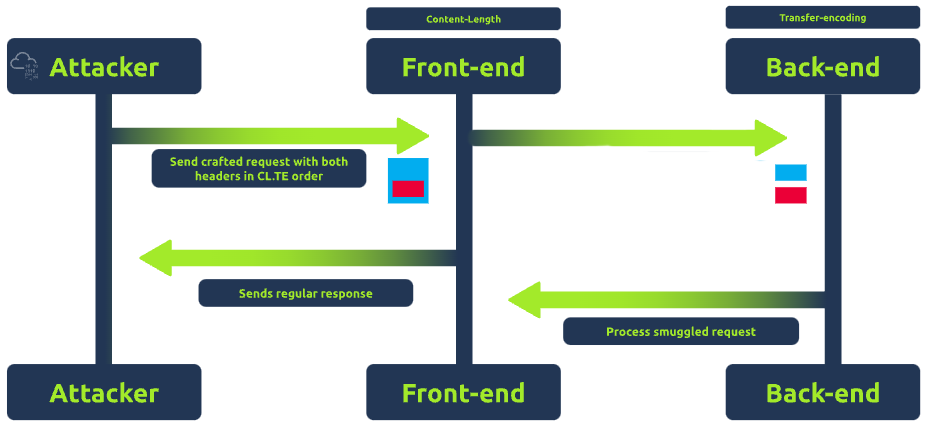
- In CL.TE, the attacker exploits the discrepancies between how different servers (typincally front-end and back-end servers) prioritize these headers to manipulate how requests are processed.
- For example:
- The proxy uses the Content-Length header to determine the end of request.
- The back-end server uses the Transfer-Encoding header.
- Have a look at the diagram below for a better understanding:
Exploiting CL.TE for Request Splitting#
- To exploit CL.TE, an attacker crafts a request that includes both the headers, ensuring that the front-end and back-end server interpret the request boundaries differently. For example, an attacker can send a request like
POST /search HTTP/1.1 Host: example.com Content-Length: 130 Transfer-Encoding: chunked 0 POST /update HTTP/1.1 Host: example.com Content-Length: 13 Content-Type: application/x-www-form-urlencoded isAdmin=true - When creating a request smuggling payload, if the
Content-Lengthis not equal to the actual length of the request body, several problem might arise. - First, the server might process only the portion of the request body that matches the
Content-Length. This could result in the smuggled part of the request being ignored or not processed as intended.
Exploiting TE.CL for Request Splitting#
This is opposite of the CL.TE method. In this case, the discrepancy occurs when header interpretation is flipped because the front-end server prioritizes the
Transfer-Encodingheader to determine the end of request, while the back-end server relies on theContent-Lengthheader.for example: an attacker can send a request like
POST / HTTP/1.1
Host: example.com
Content-Length: 4
Transfer-Encoding: chunked

78
POST /Update HTTP/1.1
Host: example.com
Content-Length: 13
Content-Type: application/x-www-form-urlencoded

isAdmin=true
0
In the above payload, the front-end server sees the
Transfer-Encoding: chunkedheader and process the request as a chunked request. The78(hexadecimal for 120) indicates the next 120 bytes are part of the current request body. The front-end server considers everything up to the0as part of the first request.The back-end server, however, sees the
Content-Length: 4header and processes only the first 4 bytes of the request body, not including the smuggled request. The remaining part of the request, starting withPOST /Update HTTP/1.1, is treated by the back-end server as a separate, new request.The smuggled request is processed by the back-end server as a new, independent request, having payload
isAdmin=true, potentially elevate the privileges of the user depending upon the application logic.
Transfer Encoding Obfuscation (TE.TE)#
- In TE.TE, both the front-end and back-end servers prioritize the
Transfer-Encodingheader, but they may interpret it differently due to inconsistant handling of Transfer-Encoding in headers. - This vulnerability doesnt always requie multiple transfer-encoding headers, instead a single, malformed transfer-encoding header that is interpreted differently by the front-end and back-end servers. In some cases, the front-end server may ignore the malformed part of header, and process the request normally, while the back-end server may interpret the request differently due to the malformed header, leading to request smuggling.
- To exploit the TE.TE technique, an attacker may craft a request that includes Transfer-Encoding headers that use different encodings. For example, an attacker sends a request like:
POST / HTTP/1.1 Host: example.com Transfer-Encoding: chunked Transfer-Encoding: chunked1 4e POST /update HTTP/1.1 Host: example.com Content-Length: 15 isAdmin=true 0 - In the above payload, the front-end server encounters both headers of
Transfer-Encoding, first one is standard, but the second,chunked1, is malformed, is non-standard. Depending upon its configuration, the front-end server might process the request based on the first header, and ignore the second one. - And the backend server could either reject the malformed part and the request similarly to fron-end server or interpret the request differently due to presence of non-standard header. If it process only the first 4 bytes as indicated by the
4echunk size, it will treat the smuggled request as a separate, new request.
Mitigations#
- Uniform Header Handling: Ensure all servers handle headers in the same manner to prevent smuggling opportunities.
- Embrace HTTP/2: Switching to HTTP/2 can enhance the management of request boundaries, reducing the risk of smuggling.
- Ongoing Surveillance and Reviews: Keep an eye on server traffic for smuggling signs and perform periodic checks to maintain secure server setups.
- Team Awareness: Make sure both development and operations teams understand the dangers of request smuggling and the preventive measures.
HTTP/2 Explained#
The second version of HTTP protocol proposes several changes over the original HTTP specification.
The new protocol intends to overcome the problems inherent to HTTP/1.1 by the message format and how the client and server communicate.
One of the key differences is that HTTP/2 requests and responses use a completely binary protocol unlike HTTP/1.1 which uses text-based protocol (human-readable). This is a massive improvement over the older version since it allows any binary information to be sent in a way that is easier for machines to parse without making mistakes.
While HTTP/2 binary format is difficult to read for humans, we will use simplified representation of request in this blog. Here’s a visual representations of HTTP/2 requests compared with an HTTP/1.1 requests.

The HTTP/2 request has following components:
- Pseudo-headers: These are headers that start with a colon (:), are minimum required for HTTP/2 request. Examples include
:method,:path,:scheme,:authorityas shown in image above. - Regular headers: We have regular headers like
content-type,authorization, etc., which are same as HTTP/1.1 but all in lowercase. - Payload: The actual data being sent in the request, same as HTTP/1.1
- Pseudo-headers: These are headers that start with a colon (:), are minimum required for HTTP/2 request. Examples include
Request smuggling and http/2#
- One of the main reasons http request smuggling is possible in HTTP/1.1 is existance of several ways to define the size of request body. This ambiguity in the protocol leads to different proxies having their own interpretation of where a request ends and next one begins, ultimately ending in request smuggling scenerios.
- The HTTP/2 was built to improve on many of characteristics of HTTP/1.1. One of the key improvements is