CORS and SOP
Same-Origin Policy (SOP)#
- SOP is a policy that instructs how web browsers interact between web pages.
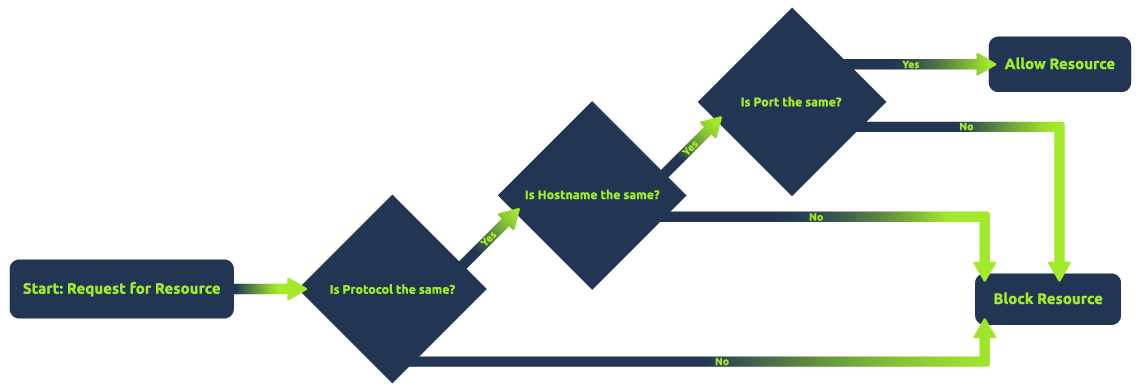
- According to this policy, a script on one web page can access data on another only if both pages share the same origin. This “origin” is identified by combining the URI scheme, hostname, and port number.
- Have a look on below image to understand SOP better.
Cross-Origin Resource Sharing (CORS)#
- CORS is a mechanism defined by HTTP headers that allows servers to specify how resources can be requested from different origins.
- While the Same-Origin Policy (SOP) restricts web pages by default to making requests to the same domain, CORS enables servers to declare exceptions to this policy, allowing web pages to request resources from other domains under controlled conditions.
- CORS operates through a set of HTTP headers that the server sends as part of its response to a browser. These headers inform the browser about the server’s CORS policy, such as which origins are allowed to access the resources, which HTTP methods are permitted, and whether credentials can be included with the requests.
- Here are the most common headers used in CORS:
Header Description Access-Control-Allow-Origin This header specifies which domains are allowed to access the resources. For example, Access-Control-Allow-Origin: example.com allows only requests from example.com. Access-Control-Allow-Methods Specifies the HTTP methods (GET, POST, etc.) that can be used during the request. Access-Control-Allow-Headers Indicates which HTTP headers can be used during the actual request. Access-Control-Max-Age Defines how long the results of a preflight request can be cached. Access-Control-Allow-Credentials This header instructs the browser whether to expose the response to the frontend JavaScript code when credentials like cookies, HTTP authentication, or client-side SSL certificates are sent with the request.
Simple Requests vs. Preflight Requests#
- There are two primary types of requests in CORS: simple requests and preflight requests.
- Simple requests are those that meet the following criteria:
- The HTTP method is one of the following: GET, HEAD, or POST.
- The HTTP headers are a subset of the following: Accept, Accept-Language, Content-Language, Content-Type (with a value of application/x-www-form-urlencoded, multipart/form-data, or text/plain), and DPR, Downlink, Save-Data, Viewport-Width, and Width.
- The Content-Type header, if present, is one of the following: application/x-www-form-urlencoded, multipart/form-data, or text/plain.
- Preflight requests are those that do not meet the criteria for simple requests. These requests are made using the OPTIONS method and include additional headers or methods that are not allowed by the server.
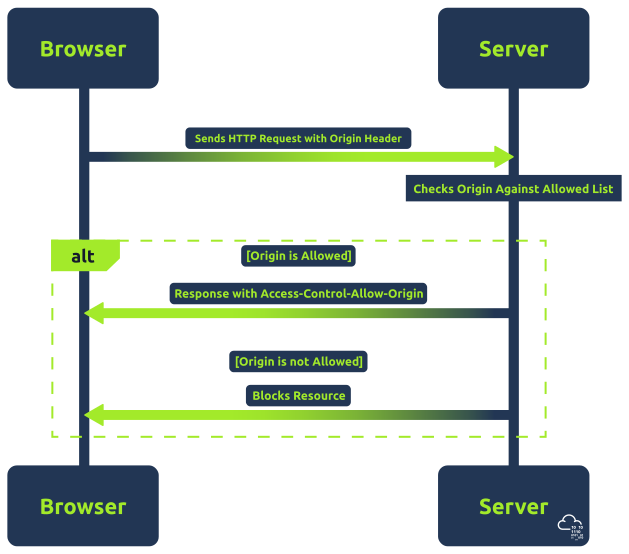
- Have a look on how process of CORS works in below image.
Access-Control-Allow-Origin Header (ACAO) in Depth#
- ACAO header is the most important header in CORS, as it defines which origins are allowed to access the resources.
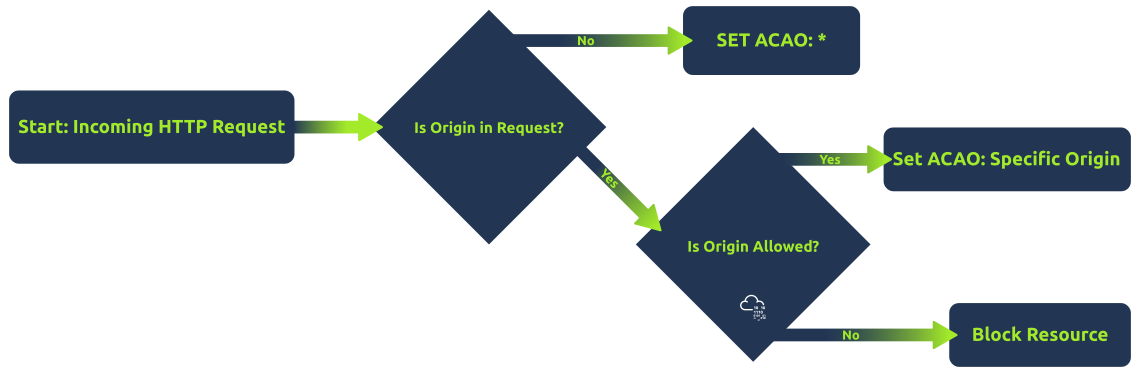
- When a browser makes a cross-origin request, it includes the origin of the requesting site in the HTTP request. The server then checks this origin against its CORS policy. If the origin is permitted, the server includes the Access-Control-Allow-Origin header in the response, specifying either the allowed origin or a wildcard (*), which means any origin is allowed.
ACA0 Configurations#
lets see below table for quick view of ACAO Configurations
Config Description Single Origin - Configuration: Access-Control-Allow-Origin: https://example.com
- Implication: Only requests originating from https://example.com are allowed. This is a secure configuration, as it restricts access to a known, trusted origin.Multiple Origins - Configuration: Dynamically set based on a list of allowed origins.
- Implication: Allows requests from a specific set of origins. While this is more flexible than a single origin, it requires careful management to ensure that only trusted origins are included.Wildcard Origin - Configuration: Access-Control-Allow-Origin: *
- Implication: Permits requests from any origin. This is the least secure configuration and should be used cautiously. It’s appropriate for publicly accessible resources that don’t contain sensitive information.With Credentials - Configuration: Access-Control-Allow-Origin set to a specific origin (wildcards not allowed), along with Access-Control-Allow-Credentials: true
- Implication: Allows sending of credentials, such as cookies and HTTP authentication data, to be included in cross-origin requestsHave a look on below image for quick view of ACAO Configurations
Common CORS Misconfigurations#
- lets see below table for quick view of Common CORS Misconfigurations
config description Null Origin Misconfiguration - This occurs when a server accepts requests from the “null” origin
- Can happen from file:// or data URL origins
- Attackers can craft phishing emails with malicious HTML files
- Victims opening files send requests from ’null’ origin
- Servers should explicitly validate and not trust ’null’ originBad Regex in Origin Checking - Improperly configured regex in origin validation
- Example: /example.com$/ allows badexample.com
- Attackers can register domains matching flawed regex
- Subdomain issues: allowing example.com* permits example.com.attacker123.com
- Applications should test regex patterns thoroughlyTrusting Arbitrary Supplied Origin - Servers echo back Origin header in Access-Control-Allow-Origin
- Effectively allows any origin to bypass SOP
- Attackers craft custom HTTP requests with controlled origin
- Solution: maintain allowlist of allowed origins instead of echoing