The Lay of the Land
Introduction#
- It is essential to be familiar with the environment where you have intial access to a compromized machine during a red team engagement. Therefore performing reconnaissance and enumeration is crucial, and primary goal is to gather as much information as possible to be used in the next stage. With an intial foothold established, the post exploitation process begins!
Network Infrastructure#
- Once arriving onto an unknown network, our first goal is to identify where we are and what we can get to. During the red team engagement, we need to understand what target system we are dealing with, what service the machine provides, what kind of network we are in. Thus, the enumeration of the compromised machine after getting intial access is the key to answering these questions.
- Network segmentation is an extra layer of network security divided into multiple subnets. It is used to improve the security and management of the network. For example, it is used for preventing unauthorized access to corporate most valuable assets such as customer data, financial records etc.
- The Virtual Local Area Network (VLANs) is network technique used in the network segmentation to control networking issues, such as broadcasting issues in the local network, and improve security. Hosts within the VLAN can only communicate with other hosts in same VLAN network.
Internal Networks#
- These are subnetworks that are segmented an separated based on importance of internal device or the importance of the accessebility of its data. The main purpose of internal network(s) is to share information, faster and easier communication, collabation tools, operation systems, and network services within organization.
- In a corporate network, Network Admnistrator intend to use network segmentation for various reasons, including controlling network traffic, optimizing network performance, and improving security posture.
A Demilitarized Zone (DMZ)#
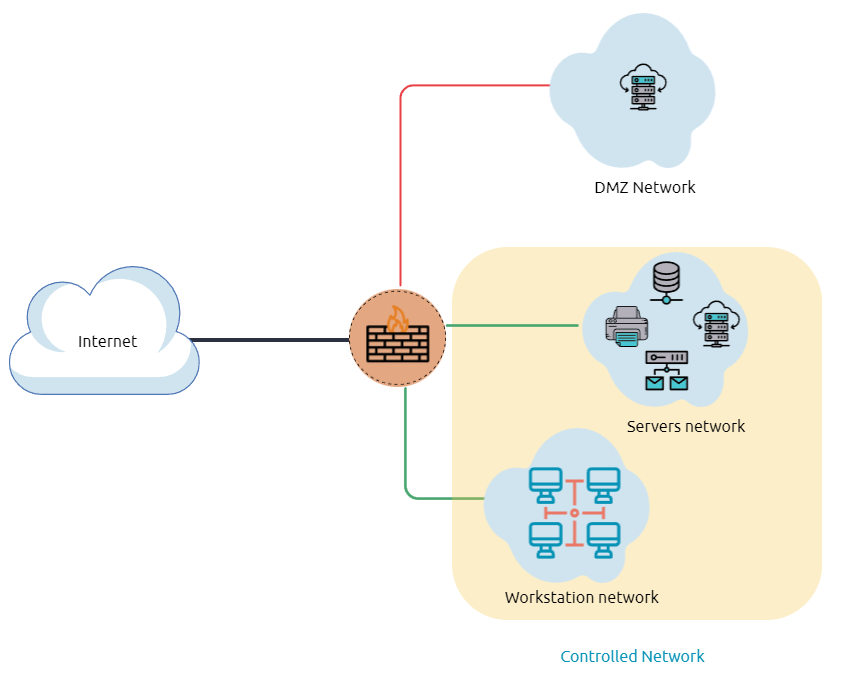
- A DMZ network is an edge network that protects and adds an extra security to a corporate’s internal local area network from untrusted traffic. A common design for DMZ is a subnetwork that sites between the public internet and internal networks.
- Designing a network within the company depends on its requirements and need. For example, suppose provides public services such as a website, DNS, FTP, Proxy, VPN etc In this case, they may design a DMZ network to isolate and enable access control on public network traffic, untrusted traffic.
- In the below diagram, represents the network traffic to DMZ network in red color, which is untrusted. The green network traffic between the internal network is the controlled traffic that may go through one or more network security devices.
Network Enumeration#
- There are various things to check related networking aspects as TCP, UDP ports and established connections, routing tables, ARP tables, etc..
# Lets start checking the target machine's TCP, UDP open ports, with the netstat.
netstat -an

# Let's list the ARP table, which contains the IP address and
# the physical address of the computers that communicated with the target machines within the network.
arp -a
Active Directory (AD) Environment#
It is a Windows-based directory service that stores and provides data objects to the internal network environment. It allows for centralized management of authentication and authorization.
The AD contains essential information about the network and the environment, including users, computers, printers, etc. For example, AD might have users’ details such as job title, phone number, address, passwords, groups, permission, etc.
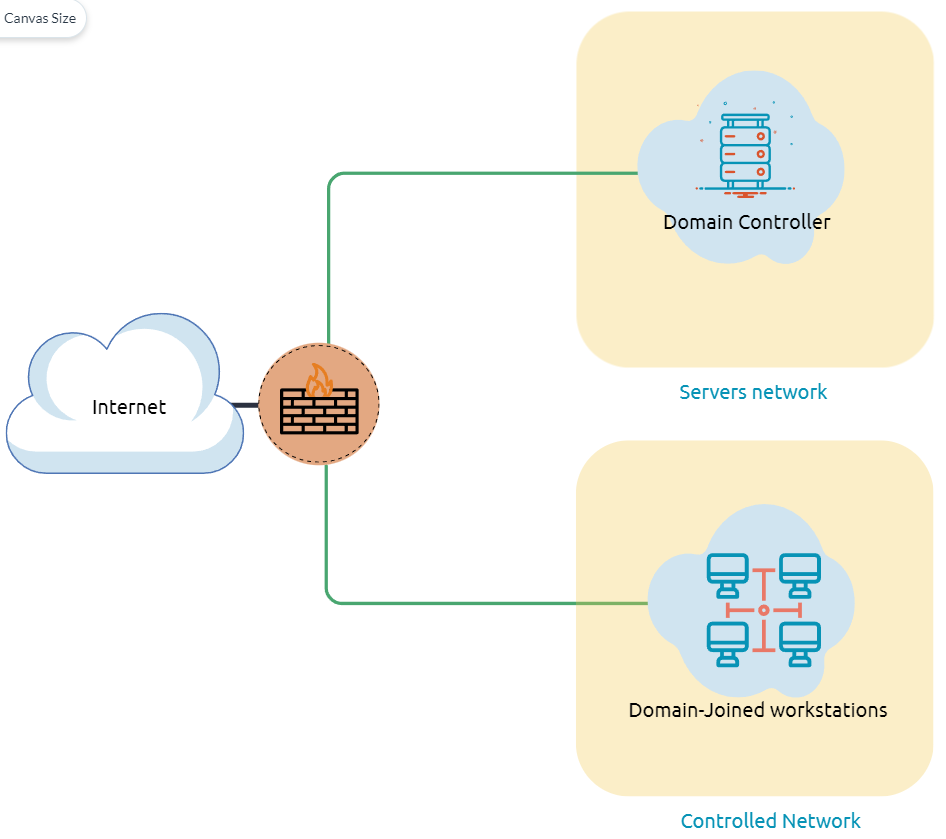
The diagram is one possible example of how Active Directory can be designed. The AD controller is placed in a subnet for servers (shown below as server network), and then the AD clients are on a separate network where they can join the domain and use the AD services via the firewall.
The following is a list of Active Directory components that we need to be familiar with:
- Domain Controllers
- Organizational Units
- AD objects
- AD Domains
- Forest
- AD Service Accounts: Built-in local users, Domain users, Managed service accounts
- Domain Administrators
A Domain Controller is a Windows server that provides Active Directory services and controls the entire domain. It is a form of centralized user management that provides encryption of user data as well as controlling access to a network, including users, groups, policies, and computers. It also enables resource access and sharing. These are all reasons why attackers target a domain controller in a domain because it contains a lot of high-value information.
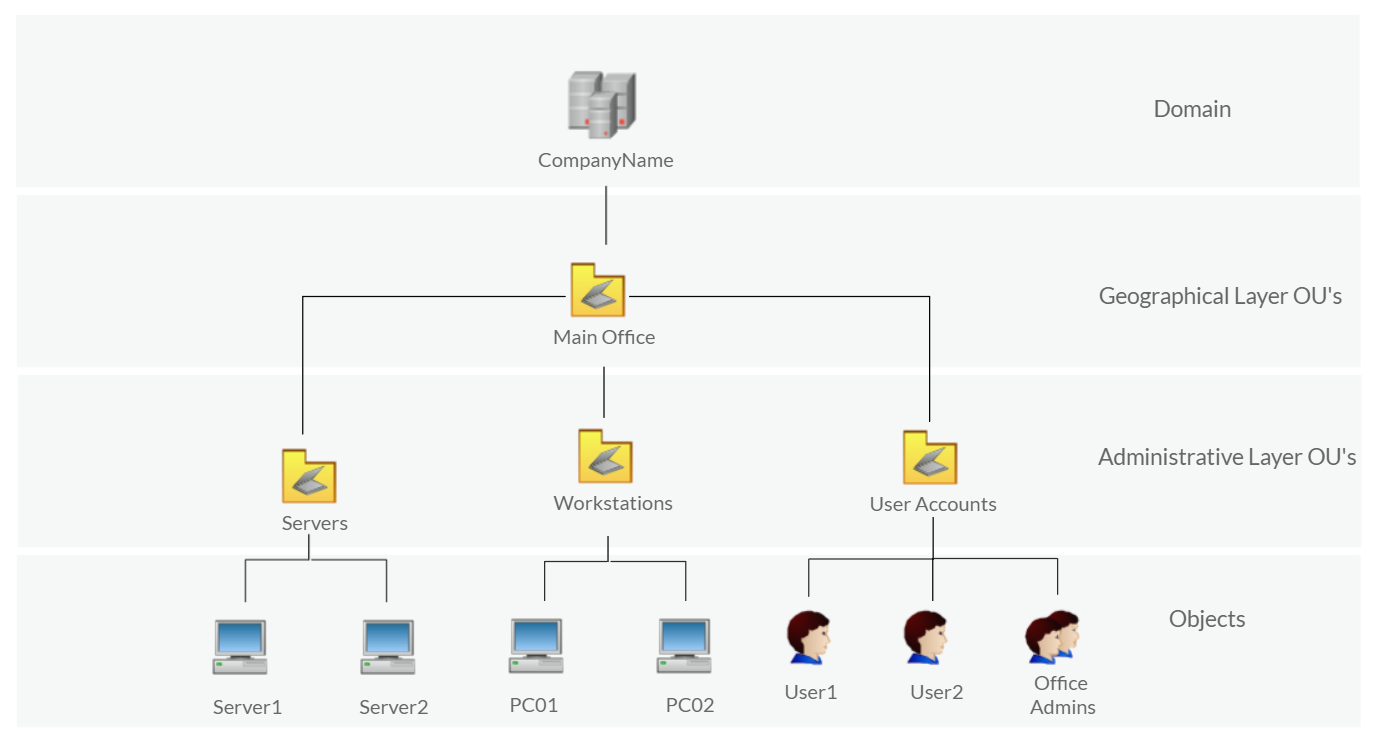
Organizational Units (OU’s) are containers within the AD domain with a hierarchical structure.
Active Directory Objects can be a single user or a group, or a hardware component, such as a computer or printer. Each domain holds a database that contains object identity information that creates an AD environment, including:
- Users: A security principal that is allowed to authenticate to machines in the domain
- Computers: A special type of user accounts
- GPOs: Collections of policies that are applied to other AD objects
AD domains are a collection of Microsoft components within an AD network.
AD Forest is a collection of domains that trust each other.
Once Initial Access has been achieved, finding an AD environment in a corporate network is significant as the Active Directory environment provides a lot of information to joined users about the environment. As a red teamer, we take advantage of this by enumerating the AD environment and gaining access to various details, which can then be used in the lateral movement stage.
In order to check whether the Windows machine is part of the AD environment or not, one way, we can use the command prompt
systeminfocommand. The output of this command provides information about the machine, including the operating system name and version, hostname, and other hardware information as well as the AD domain.systeminfo | findstr /i "Domain"
Users and Management#
An Active Directory environment contains various accounts with the necessary permissions, access, and roles for different purposes. Common Active Directory service accounts include built-in local user accounts, domain user accounts, managed service accounts, and virtual accounts.
Type of Account Description Built-in local user’s accounts Used to manage the system locally, which is not part of the AD environment. Domain user accounts Have access to an active directory environment and can use the AD services (managed by AD). AD managed service accounts Limited domain user account with higher privileges to manage AD services. Domain Administrators - User accounts that can manage information in an Active Directory environment, including AD configurations, users, groups, permissions, roles, services, etc.
- One of the red team goals in engagement is to hunt for information that leads to a domain administrator having complete control over the AD environment.The following are Active Directory Administrators accounts:
Account Name Description BUILTIN\Administrator Local admin access on a domain controller Domain Admins Administrative access to all resources in the domain Enterprise Admins Available only in the forest root Schema Admins Capable of modifying domain/forest; useful for red teamers Server Operators Can manage domain servers Account Operators Can manage users that are not in privileged groups
Active Directory (AD) Enumeration#
- Now, enumerating in the AD environment requires different tools and techniques. Once we confirm that the machine is part of the AD environment, we can start hunting for any variable info that may be used later. In this stage, we are using PowerShell to enumerate for users and groups.
- The following PowerShell command is to get all active directory user accounts. Note that we need to use -Filter argument.
Get-ADUser -Filter * - We can also use the LDAP hierarchical tree structure(opens in new tab) to find a user within the AD environment. The Distinguished Name (DN) is a collection of comma-separated key and value pairs used to identify unique records within the directory. The DN consists of Domain Component (DC), Organizational Unit (OU), and Common Name (CN) and Others.
- The following
"CN=User1, CN=Users, DC=thmredteam, DC=com"is an example of a Distinguished Name, which can be visualized as follows: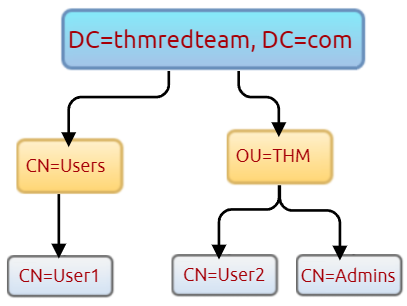
- Using the
SearchBaseoption, we specify a specific Common-Name CN in the active directory. For example, we can specify to list any user(s) that part of Users.# Get all users in the Users with in CN Get-ADUser -Filter * -SearchBase "CN=Users,DC=THMREDTEAM,DC=COM" # get all users with OU 'THM' and domain 'thmredteam' Get-ADUser -Filter * -SearchBase "OU=THM,DC=thmredteam,DC=com"
Host Security Solution #1#
- Before performing further actions, we need to obtain general knowledge about the security solutions in place. Remember, it is important to enumerate antivirus and security detection methods on an endpoint in order to stay as undetected as possible and reduce the chance of getting caught.
- It is a set of software applications used to monitor and detect abnormal and malicious activities within the host, including:
- Antivirus software
- Microsoft Windows Defender
- Host-based Firewall
- Security Event Logging and Monitoring
- Host-based Intrusion Detection System (HIDS)/ Host-based Intrusion Prevention System (HIPS)
- Endpoint Detection and Response (EDR)
Antivirus Software#
Antivirus software also known as anti-malware, is mainly used to monitor, detect, and prevent malicious software from being executed within the host.
Most antivirus software applications use well-known features, including Background scanning, Full system scans, Virus definitions.
In the background scanning, the antivirus software works in real-time and scans all open and used files in the background. The full system scan is essential when you first install the antivirus.
The most interesting part is the virus definitions, where antivirus software replies to the pre-defined virus. That’s why antivirus software needs to update from time to time.
There are various detection techniques that the antivirus uses, including:
- Signature-based detection
- Heuristic-based detection
- Behavior-based detection
Signature-based detection is one of the common and traditional techniques used in antivirus software to identify malicious files. Often, researchers or users submit their infected files into an antivirus engine platform for further analysis by AV vendors, and if it confirms as malicious, then the signature gets registered in their database. The antivirus software compares the scanned file with a database of known signatures for possible attacks and malware on the client-side. If we have a match, then it considers a threat.
Heuristic-based detection uses machine learning to decide whether we have the malicious file or not. It scans and statically analyses in real-time in order to find suspicious properties in the application’s code or check whether it uses uncommon Windows or system APIs. It does not rely on the signature-based attack in making the decisions, or sometimes it does. This depends on the implementation of the antivirus software.
Behavior-based detection relies on monitoring and examining the execution of applications to find abnormal behaviors and uncommon activities, such as creating/updating values in registry keys, killing/creating processes, etc.
As a red teamer, it is essential to be aware of whether antivirus exists or not. It prevents us from doing what we are attempting to do. We can enumerate AV software using Windows built-in tools, such as
wmic.
# using cmdline
wmic /namespace:\\root\securitycenter2 path antivirusproduct

# using powershell
Get-CimInstance -Namespace "root\SecurityCenter2" -ClassName "AntivirusProduct"
- Note that Windows servers may not have SecurityCenter2 namespace, which may not work on the attached VM. Instead, it works for Windows workstations.
Microsoft Windows Defender#
- Microsoft Windows Defender is a pre-installed antivirus security tool that runs on endpoints. It uses various algorithms in the detection, including machine learning, big-data analysis, in-depth threat resistance research, and Microsoft cloud infrastructure in protection against malware and viruses. MS Defender works in three protection modes: Active, Passive, Disable modes.
- Active mode is used where the MS Defender runs as the primary antivirus software on the machine where provides protection and remediation.
- Passive mode is run when a 3rd party antivirus software is installed. Therefore, it works as secondary antivirus software where it scans files and detects threats but does not provide remediation.
- Disable mode is when the MS Defender is disabled or uninstalled from the system.
- We can use the following PowerShell command to check the service state of Windows Defender:
Get-Service -Name "WinDefend" - Next, we can start using the Get-MpComputerStatus cmdlet to get the current Windows Defender status. However, it provides the current status of security solution elements, including Anti-Spyware, Antivirus, LoavProtection, Real-time protection, etc. We can use select to specify what we need for as follows,
Get-MpComputerStatus | select RealTimeProtectionEnabled
Host Based Firewall#
It is a security tool installed and run on a host machine that can prevent and block attacker or red teamers’ attack attempts. Thus, it is essential to enumerate and gather details about the firewall and its rules within the machine we have initial access to.
The main purpose of the host-based firewall is to control the inbound and outbound traffic that goes through the device’s interface. It protects the host from untrusted devices that are on the same network. A modern host-based firewall uses multiple levels of analyzing traffic, including packet analysis, while establishing the connection.
A firewall acts as control access at the network layer. It is capable of allowing and denying network packets. For example, a firewall can be configured to block ICMP packets sent through the ping command from other devices in the same network. Next-generation firewalls also can inspect other OSI layers, such as application layers. Therefore, it can detect and block SQL injection and other application-layer attacks.
# Get firewall profile rules
Get-NetFirewallProfile | Format-Table Name, Enabled

# If we admin privilages on current user we loggedin,
# then we try to disable one or more firewall profiles using Set-NetFirewallProfile
Set-NetFirewallProfile -Profile Domain,Public,Private -Enabled False
Get-NetFirewallProfile | Format-Table Name, Enabled

# we can also learn and check the current firewall rules,
Get-NetFirewallRule | Format-Table Name, Enabled, Description

# We can test inbound connection without extra tools
# For example, we can test if we can connect to a specific port on a remote host
# using the Test-NetConnection cmdlet
Test-NetConnection -ComputerName <remote_host> -Port <port>
Host Security Solution #2#
- There are vaious categories where the windows os logs even information, including application, system, security, services etc In addition, security and network devices store event information into log files to allow the system administration to get an insight into what is going on.
- We can get a list of available event logs on the local machine using
Get-EventLog -List
System Monitor (Sysmon)#
- Windows Sysmon is a service and device driver, its one of Mircrosoft’s Sysinternals suite of tools.
- Sysmon is not an essential tool, but it starts gathering and logging events once installed. These logs indicators can significantly help system admins and blue teamers to track and investigate malicious activity and help with general trouble shooting.
- One of great features of sysmon is that it can log many important events and you can also create your own rule(s) and configuration to monitor:
- Process creation and termination
- Network connection
- Modification on file
- Remote threats
- Process and memory access
- and many others
- We can look for a process that has been named “Sysmon” within the current process or service as follows:
Get-Process | Where-Object {$_.ProcessName -eq "Sysmon"}or for service,Get-CimInstance win32_service -Filter "Description = 'System Monitor Service'"Get-Service | where-object {$_.DisplayName -like "*sysm*"}- With windows registry,
reg qurey HKLM\SOFTWARE\Microsoft\Windows\CurrentVersion\WINEVT\Channels\Microsoft-Windows-Sysmon/Operational - Above all of those commands, can confirm sysmon installed, once we detect it, we can try to find the sysmon configuration file if we have readable permission to understand system administrators are monitoring..
findstr /si '<ProcessCreate onmatch="exclude">' C:\tools\*.
Host based Instrusion Detection/Prevention System (HIDS/HIPS)#
- HIDS is a software that has ability to monitor and detect abnormal and malicious activities in a host. The primary purpose of HIDS is detect a suspicious activities and not to prevent them. There are two methods that the host based or network instrusion detection systems works, including
- Signature-based IDS - it looks at checksums and message authentications
- Anomaly-based IDS - looks for unexpected activities, including abnormal bandwidth usage, protocols, and ports
- HIPS secure os activities of device where they are installed, its a detection and prevention solution against well known attacks and abnormal behaviours. It can audit the hosts logs, monitor processes, and protect system resources. HIPS combimnes many product features such as antivirus, behaviour analysis, network, and application firewall etc.
Endpoint Detection and Response (EDR)#
- It is also known as Endpoint Threat Detection and Response (ETDR), and is a cybersecurity solution that defends against malware and other threats. EDRs can look for malicious files, monitor endpoint system, network events, and record them in a database for further analysis, detection and investigation.
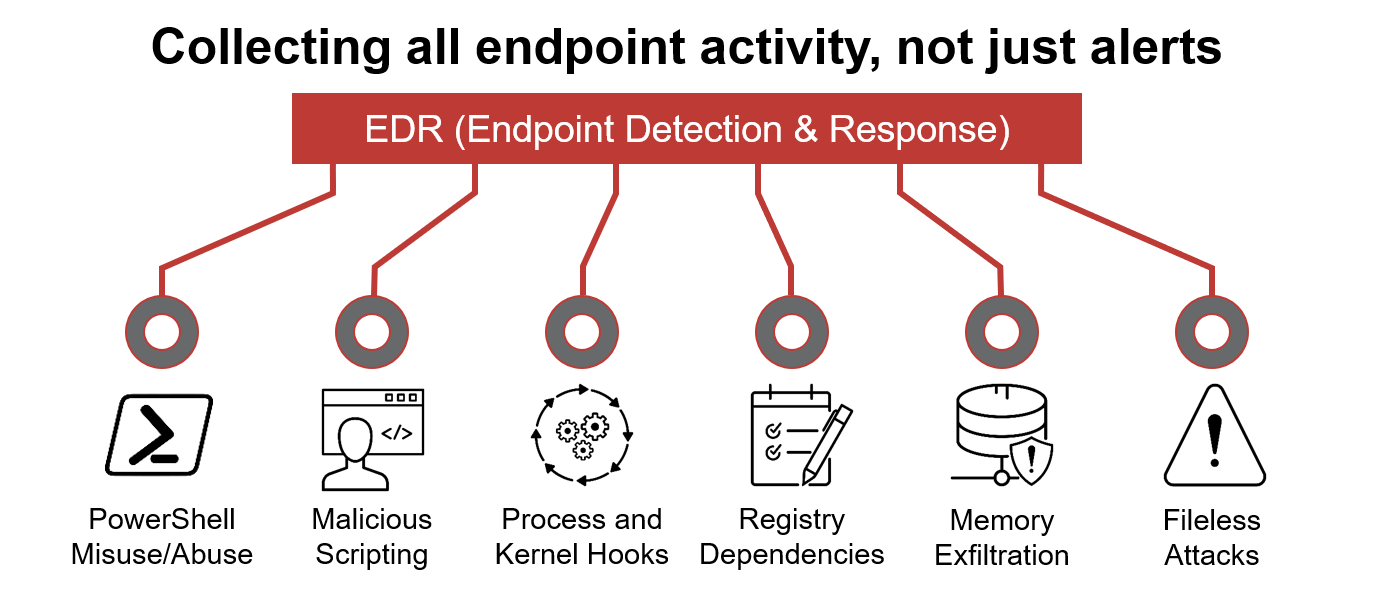
- EDRs are the next generation of antivirus and detect malicious activities on host in real-time.
- It analyze system data and behaviour for making section threats including..
- Malware, including viruses, trojans, adware, keyloggers..
- Exploit chains
- Ransomware
- Below are some common EDR software for endpoints
- Cylance
- Crowdstrike
- Symantec
- SentinelOne
- Many Others
- Even though an attacker successfully delivered their payload and bypassed EDR in receiving reverse shell, EDR is still running and monitors the system. It may block us from doing somthing else if it flags an alert.
- We can use scripts for enumerating security products within the machine, such as Invoke-EDRChecker and SharpEDRChecker. They check for commonly used Antivirus, EDR, logging monitor products by checking file metadata, processes, DLL Loaded into current processes, Services, and drivers, Directories.
Network Security Solutions#
- These could be software or hardware appliances used to monitor, detect and prevent malicious activities within the network.
- It foucuses on protecting clients and devices connected to the corporate network, these may include
- Network firewall
- SIEM
- IDS/IPS
Network Firewall#
- It is the firest checkpoint for untrusted traffic that arrives the network. The firewall filters traffic before passing it into the network based on rules and policies. In addition, firewall can be used to seperate networks from external traffic sources, internal traffic sources, or even specific application. Nowadays, firewall products are built-in-network routers or other security products that provide various security features. The following firewall types that enterprice may use:
- Packet filtering firewalls
- Proxy firewalls
- NAT firewalls
- Web application firewalls
Security Information and Event Management (SIEM)#
- It combines security information management (SIM) and security event management (SEM) to monitor and analyze events and track and log data in real time. SIEM helps systems admistrators and blue teamers to monitor and track potential security threats and vulnerabilities before causing damage to the organization.
- SIEM solution work as log data aggregation center, where it collects logs from various sensors and perform functions on the gathered data to identify and detect security threats or attacks. The following are some of the functions that a SIEM may offer:
- Log management
- Even analytics
- Incident monitoring and security alerts
- Compliance management and reporting
- The following are some of SIEM products that are commonly seen in many enterprices
- Splunk
- LogRhythm NextGen SIEM platform
- Solarwinds security event manager
- Datadog SEcurity Monitoring
- many others
Network Intruction Detection System and Prevention System (NIDS/NIPS)#
- NIDS/NIPS are similar concept to host based IDS/IPS. The main difference is that the network based products focus on the security of a network instead of a host. The network based solution will based on sensors and agents distributed in the network devices and hosts to collect data. IDS/IPS are both detection and monitoring cybersecurity solutions that an enterprise uses to secure internal systems. They both read network packages looking for abnormal behaviours and known threats preloaded into a previous database.
- The following are common enterprise IDS/IPS products
- Palo Alto Networks
- Cisco’s Next Generation
- McAfee Network SEcurity Platform
- Trend Micro TippingPoing
- Suricata
Application and Services#
Installed applications:#
- We may find vulnerable software installed in system to exploit, and escalate privileges by listing installed applications and their versions.
- Also, we may find some information, such as plain text-credentials, is left on system that belongs to other systems or services.
# list all installed applications and their versions
wmic product get name, version
# Another interesting thing to look for particular text strings, hidden directories, backupfiles.
Get-ChildItem -Hidden -Path C:\Users\kkidd\Desktop\
Services and Process#
- Windows services enable the sysadm to create long term executable applications in our own windows sessions, sometimes windows services have misconfigurations, which escalate the current user access level of permissions, therefore we must look at running services and perform services and process enumeration.
- Process discovery enumeration is an first step to understand what the system provides. The red team should get information and details about the running services and processes on a system. We need to understand as much as possible about our targets. This information could help us understand common software running on other systems in the network. For example, the comprimized system might have custom client application used for internal purposes. Custom internally developed software is the most common root cause of the escation vectors. thus it is worth digging more to get details about the current process.
#listing runnnig services
net start
# or
Get-Service
# or
Get-WmiObject -Class Win32_Service